Matemathics Explanations of Plot Programming
Math Explanation CODE relations
From Andraelity, how CODE using math.
In thy following lines we are going to verify or create the connexion that would allow us to unite code with mathematics
Shaders-PLANE-PolyG
Right now the ideas that we're been handling is base entirely in a representation of information that is going to be part of a more practical representaion of
visuals, what we need to clarify now is how we are able to make use of this rules in this particular way, the way that allow us represent information in the way
want, or more than that, not just represent but visualize information in this particular way.
With FIGURINES
Index Webpages Redirect
- &. Index
- 0. EulersIdentity
- 1. Derivatives
- 2. Shaders
Computer Shaders Graphics
TriangleRectangle SDF
fixed4 frag (PixelData i) : SV_Target
{

float2 uv =  i.uv ;

float4 colorWhite = float4(1,1,1,1); // Color white.
float4 colorBlack = float4(0,0,0,1); // Color Black.


float2 coordinateScale = (uv * 2.0)  - 1.0;

float2 size = float2(0.5 ,0.5);

float2 screenSpace = coordinateScale;

float disHypotenuse = dot(size, screenSpace ) - (size.x * size.y);

float sdf =  ( sign(disHypotenuse) < 0 && screenSpace.y > 0 && screenSpace.x > 0 ) ? 1.0 : 0.0 ;

float4 col = colorBlack;

col = fixed4(sdf, sdf, sdf, 1.0);

}
float2 uv =  i.uv ;
float4 colorWhite = float4(1,1,1,1); // Color white.
float4 colorBlack = float4(0,0,0,1); // Color Black.

float2 coordinateScale = (uv * 2.0)  - 1.0;
float2 size = float2(0.5 ,0.5);

float2 screenSpace = coordinateScale;

float disHypotenuse = dot(size, screenSpace ) - (size.x * size.y);

float sdf =  ( sign(disHypotenuse) < 0 && screenSpace .y > 0 && screenSpace.x > 0 ) ? 1.0 : 0.0 ;
$$\begin{aligned}
&\text{Lets explain the meaning of each single of this lines of code, and how they work combine to represent information.}\\
&\text{The assignation of vales on the first two lines of code is really straight forward.}\\
\end{aligned}$$
float2 size = float2(0.5 ,0.5);

float2 screenSpace = coordinateScale;
float disHypotenuse = dot(size, screenSpace ) - (size.x * size.y);
LineSDF
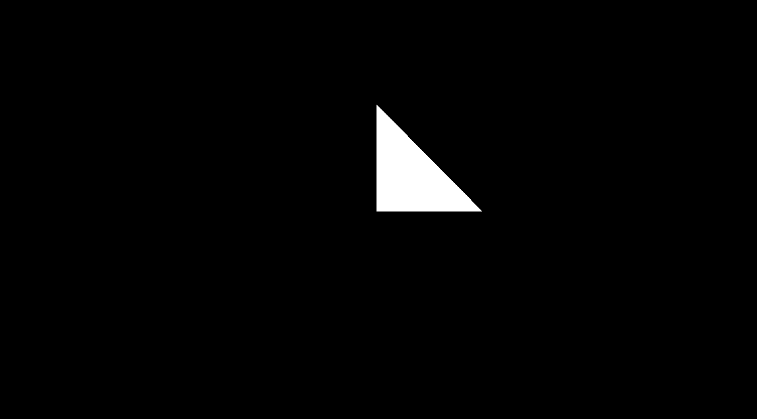
$$\begin{aligned}
&\text{This looks like a triangle to me, so the idea that we need to clarify is how we could get the points inside this triangle, }\\
&\text{ like literally all the points, how we are able to identify which points are going to be inside and outside of the triangle}\\
&\text{To be able to do that is going to be necessary for us to identify the borders, why cuz if the point is within the borders}\\
&\text{then we'll be able to comprehend which point lay or not in the section, or triangle.}\\
&\text{reprenseting more values.}\\
\end{aligned}$$
float disHypotenuse = dot(size, screenSpace ) - (size.x * size.y);
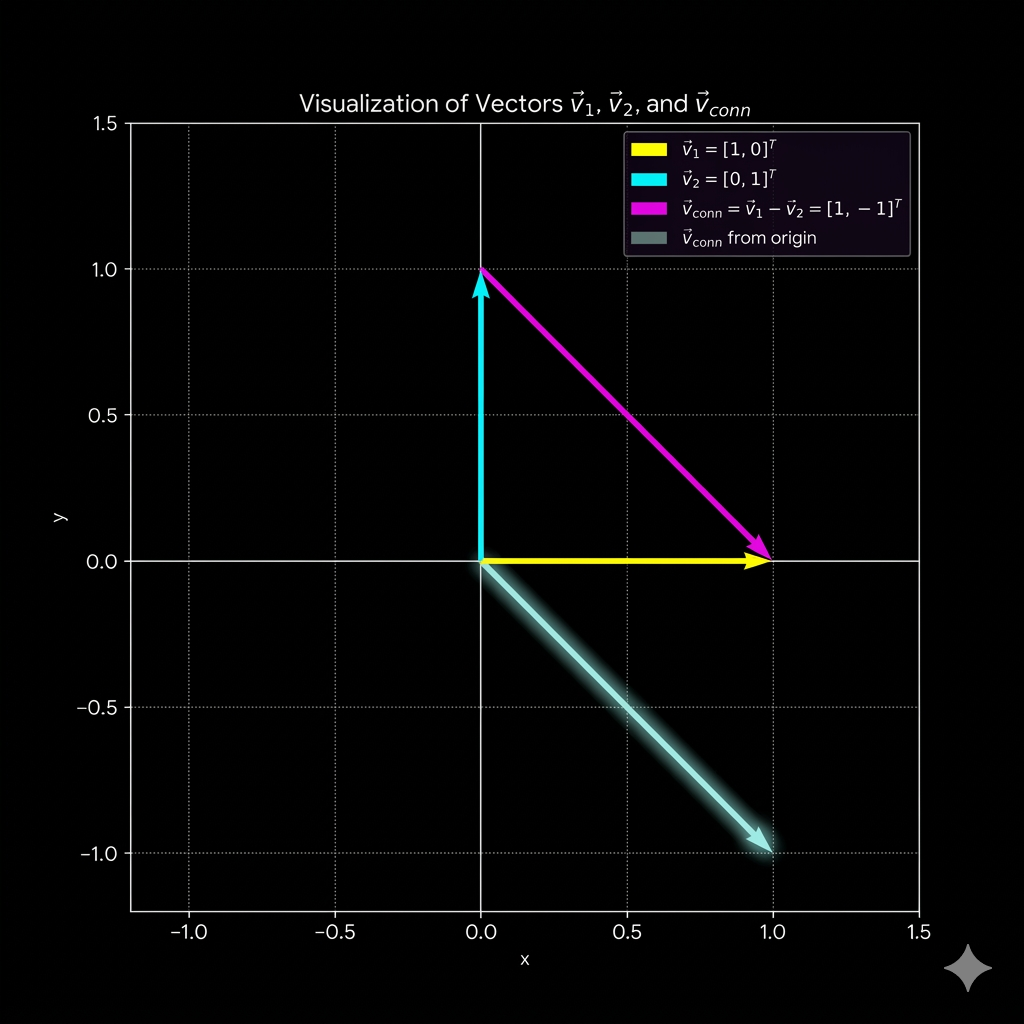
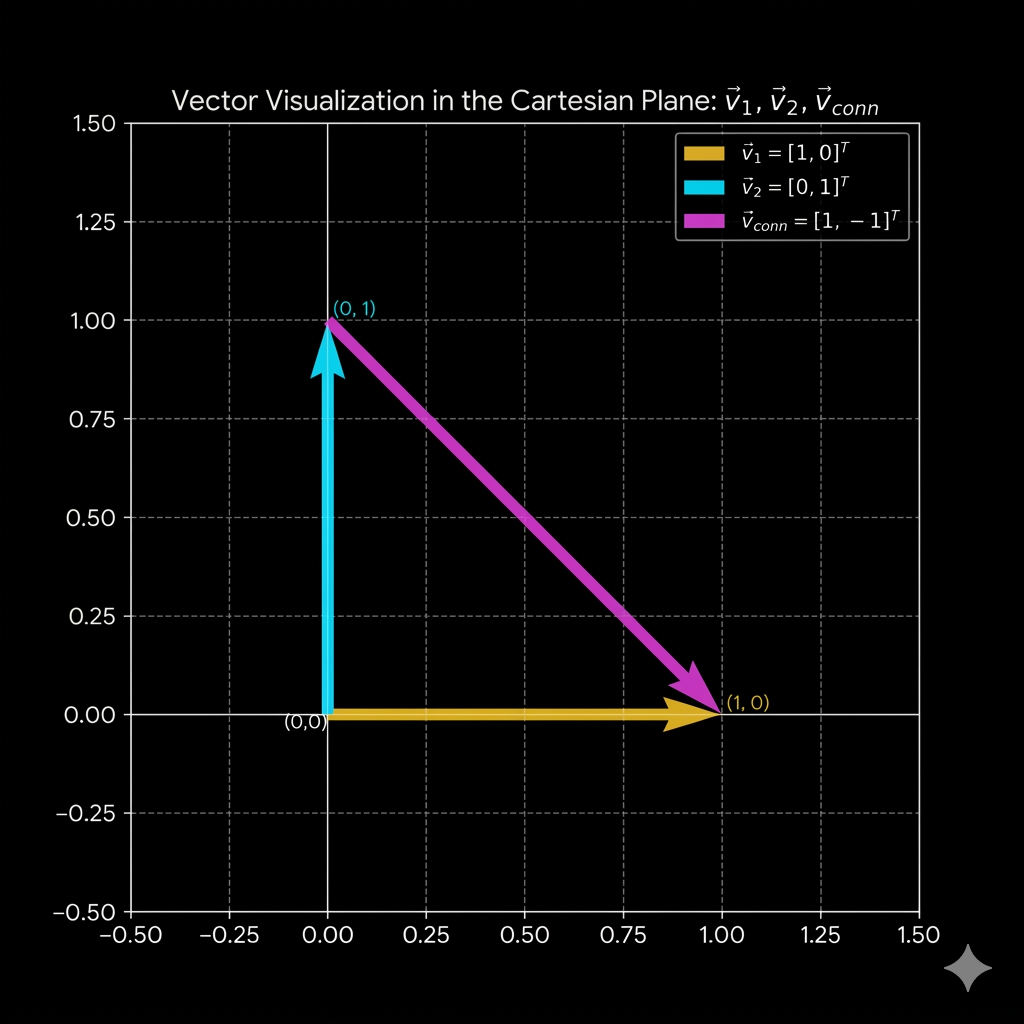
$$\begin{aligned}
&\text{so the idea would be to identify what can we do with this information to make a representation of the ideas}\\
&\text{that we want to make reality, which are the key ingredients that we need to set up in this field.}\\
&\text{lets begin with the most difficult thing to define between the three, lets define the hipothenuse.}\\
&\text{what we need to do with the hypothenusa, from the hypothenusa, what defines a hypothenusa? }\\
&\text{very important questions about the hypothenusa }\\
&\text{but overall from which place we can detail its existence.}\\
\end{aligned}$$
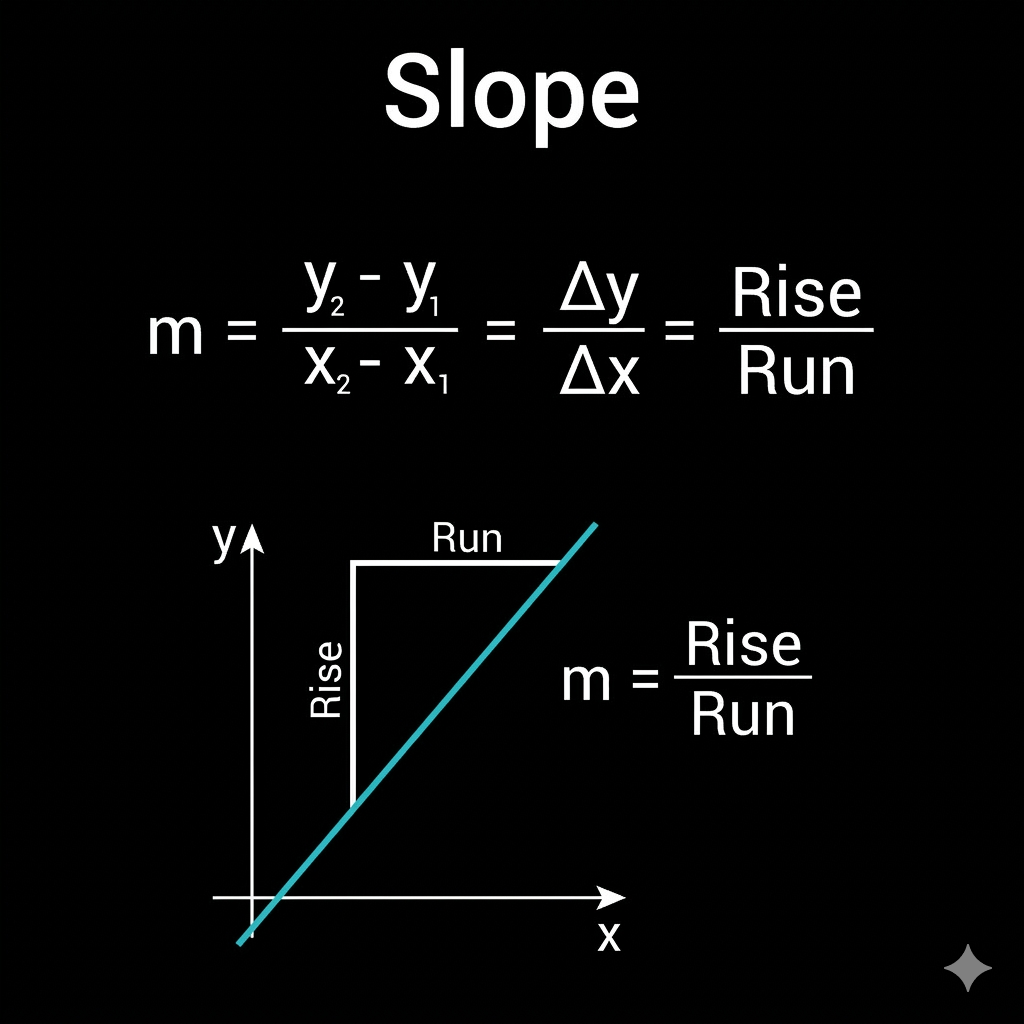
$$\text{RandomPoint =}\ \ (x, y)$$
$$\text{PointInTheLine =}\ \ (x_1, y_1)$$
$$\text{The slope of the line is define by} \ \ m$$
$$m = \frac{y - y_1}{x - x_1}$$
$$\\[5ex]$$
$$y = mx + b$$
$$\\[5ex]$$
$$\begin{aligned}
&\text{This is the conventional idea of a function, you get a value for each number of the real numbers}\\
&\text{in this case the real numbers are represented by the cartesian plane x axis.}\\
\end{aligned}$$
$$\\[5ex]$$
$$\begin{aligned}
&\text{So what the values represent in this function?, the idea is to clarify what does each value do.}\\
&\text{what does the values of the constants that made up this function do.}\\
\end{aligned}$$
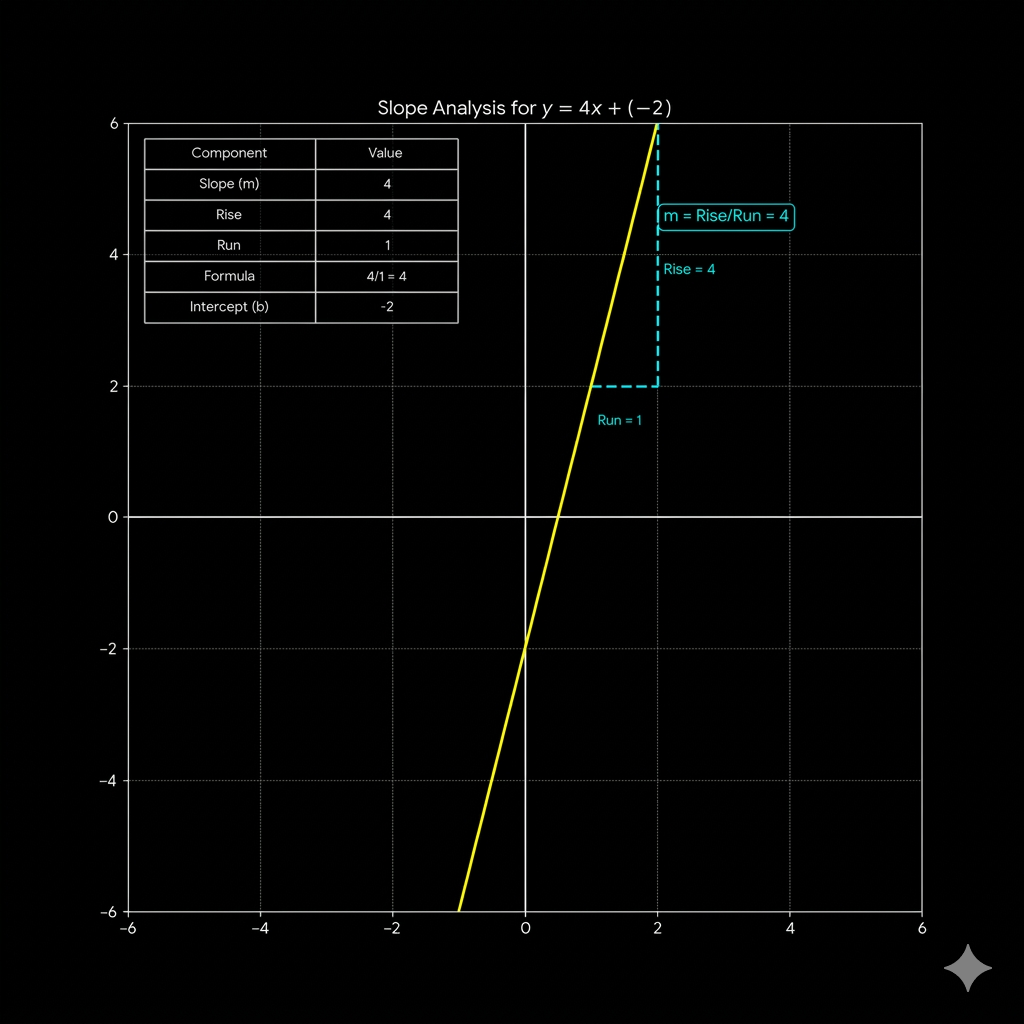
$$\text{The slope of the line is define by} \ \ m$$
$$\begin{aligned}
&\text{So what is a slope, a slope is the reason of change, of the "x" values in the "y" values}\\
&\text{the constant that made up this function.}\\
\end{aligned}$$
$$\begin{aligned}
&\text{The idea with the m slope, is to make the "y" values be "m" times the "x"}\\
&\text{which is the same idea as modify the space, of the real numbers to make it increment or}\\
&\text{descrease its values, like an scalation of the values, but for all the values in the real numbers}\\
\end{aligned}$$
$$\begin{aligned}
&\text{The second element that we need to define is the "b", which is the point where we want the}\\
&\text{line to start, only in this particular representation of the line, it works like this, the }\\
&\text{variable "b", represent from which positin of the input "x" we want the escalations to begin }\\
\end{aligned}$$
$$\begin{aligned}
&\text{one particularity of this representation of the line, is that if you want to get the values}\\
&\text{of the line to cut always both of the axis, in the same point for both the "x" and the "y" axis }\\
&\text{at the same time, the value of the m = 1}\\
\end{aligned}$$
$$\\[5ex]$$
$$y = mx + b$$
$$\\[5ex]$$
$$m = 1$$
$$\\[5ex]$$
$$y = ( 1) x + b$$
$$\\[5ex]$$
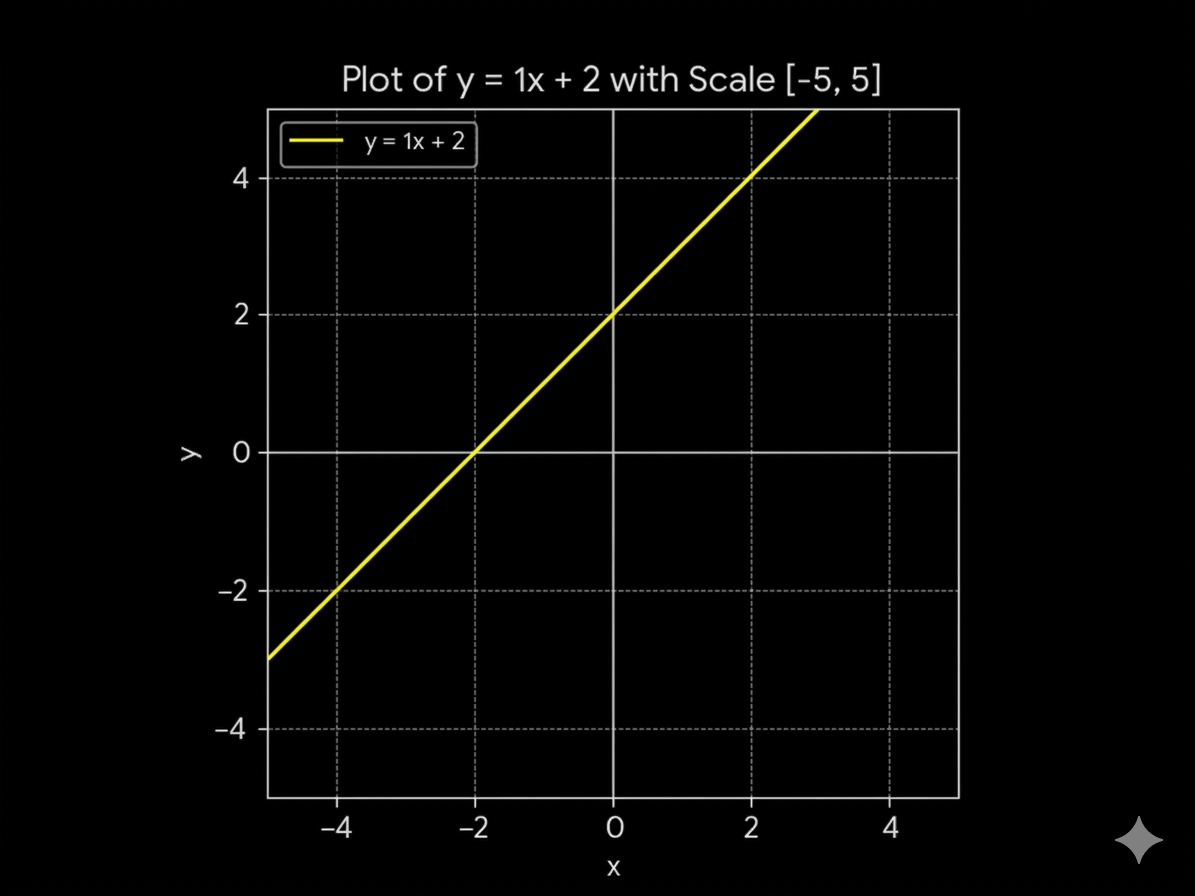
$$if \ x = 0 \ \& \ b = 2$$
$$\\[5ex]$$
$$y = ( 1) (0) + 2$$
$$\\[5ex]$$
$$y = 2$$
$$\text{cuts the line in the Y axis in }2$$
$$\\[10ex]$$
$$and\ if \ y = 2 \ \& \ b = 2$$
$$\\[5ex]$$
$$y = ( 1) x + 2$$
$$\\[5ex]$$
$$y - 2 = ( 1) x $$
$$\\[5ex]$$
$$y = 0$$
$$\\[5ex]$$
$$ 0 - 2 = ( 1) x $$
$$\\[5ex]$$
$$ x = - 2 $$
$$\text{cuts the line in the X axis in }-2$$
$$\\[5ex]$$
$$\begin{aligned}
&\text{Something that you could also do, is get the specific points where you want the line to cut the axis}\\
&\text{by following this formula.}\\
&\text{}\\
\end{aligned}$$
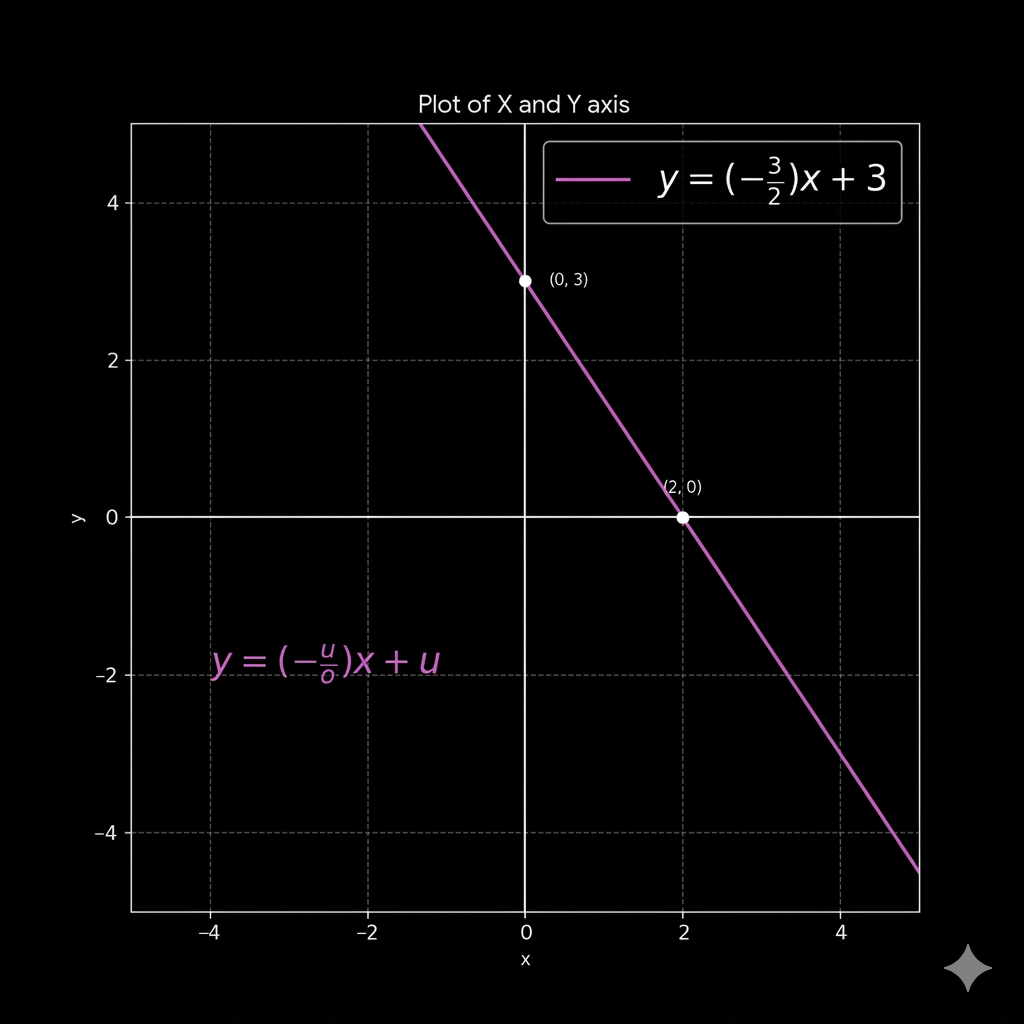
$$y = \left( -\frac{u}{o} \right) x + u$$
$$\\[5ex]$$
$$\text{now if we want to find the } u \\ $$
$$\\[5ex]$$
$$y = m(0) + u$$
$$\\[5ex]$$
$$y = u$$
$$\\[5ex]$$
$$\text{now if we want to find the } o \\ $$
$$\\[5ex]$$
$$y = 0$$
$$\\[5ex]$$
$$x = o \xrightarrow{\text{point to find }} \ (o, 0)$$
$$\\[5ex]$$
$$0 = m(o) + u \\ \\$$
$$\\[5ex]$$
$$-u = mo \\ \\$$
$$\\[5ex]$$
$$m = -\frac{u}{o}$$
$$\\[5ex]$$
$$\text{and thats how we could make the next thing to be possible} \\ $$
$$y = \left( -\frac{u}{o} \right) x + u$$
$$\\[5ex]$$
$$\text{In the next example:}$$
$$o = 2 $$
$$u = 3 $$
$$\begin{aligned}
&\text{This would be the first form to represent the line, which is the most common, and a list-ingy}\\
&\text{and single computer processor, to think about this way to express the line.}\\
&\text{descrease its values, like an scalation of the values, for all the values in the real numbers}\\
\end{aligned}$$
$$\begin{aligned}
&\text{now there is a second way to make the representation of the line, and it would be by using }\\
&\text{VECTORS, a structured of thought that is a little bit more computational parallel multiple core, }\\
&\text{processors, rather than a expression more listy single processor thinking. }\\
&\text{and the idea is based entirely on this expression}\\
\end{aligned}$$
$$\\[5ex]$$
$$0 = \mathbf{n} \cdot \mathbf{p}$$
$$\\[5ex]$$
$$\begin{aligned}
&\text{Yes, i am telling you that the equation of the line could be derived from the dot product.}\\
&\text{and its pretty simple to imagine .}\\
\end{aligned}$$
$$\\[5ex]$$
$$\mathbf{n} = (a, \, b) $$
$$\\[3ex]$$
$$\mathbf{p} = (x, \, y) $$
$$\\[3ex]$$
$$\mathbf{n} \cdot \mathbf{p} = (a \cdot x) + (b \cdot y)$$
$$\\[5ex]$$
$$\begin{aligned}
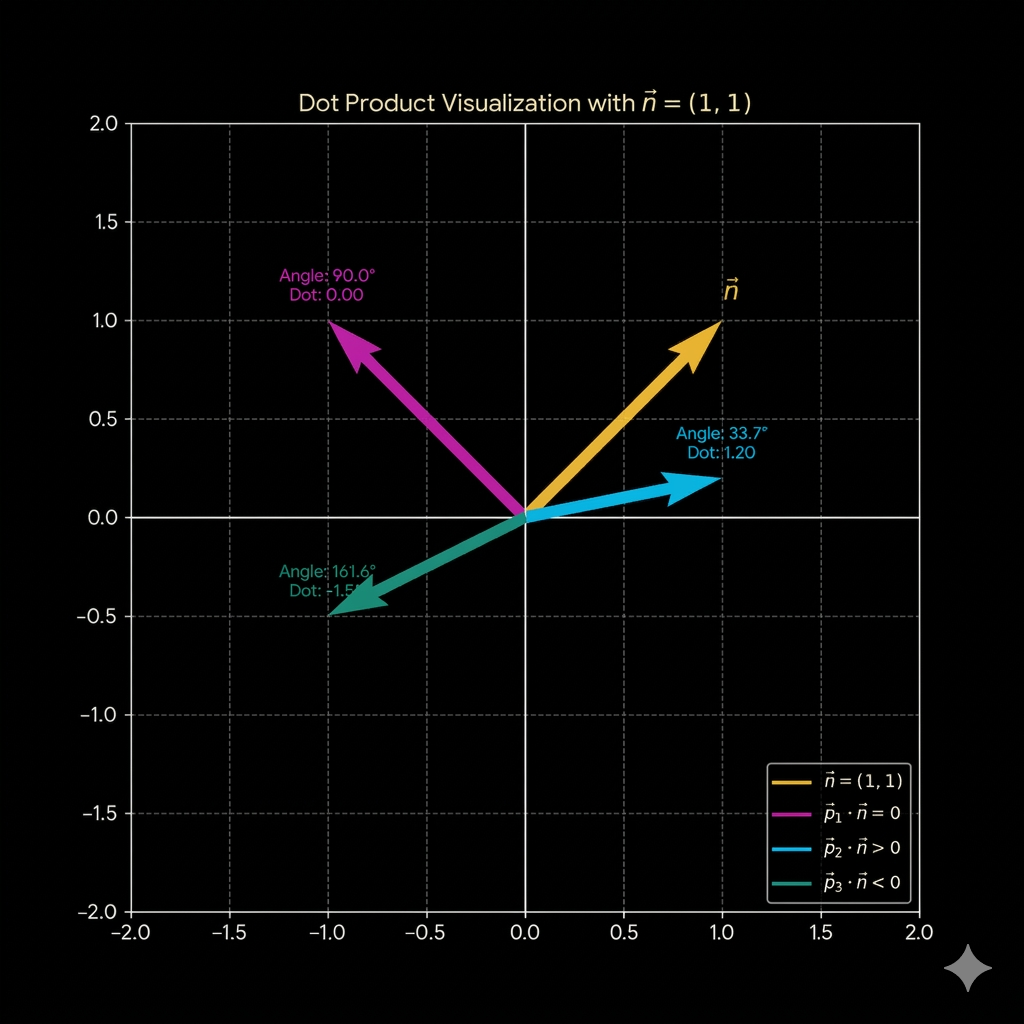
&\text{So the main idea when you take the dot product is that it would return 3 type of things,}\\
&\text{and its pretty simple to imagine .}\\
\end{aligned}$$
$$\begin{aligned}
&\text{Points where \ } \mathbf{n} \cdot \mathbf{p} = 0 \ \| \text{the angle between these two vectors is exactly 90 }\degree\\
&\text{Points where \ } \mathbf{n} \cdot \mathbf{p} > 0 \ \| \text{the angle between these two vectors is lesser than 90)\degree}\\
&\text{Points where \ } \mathbf{n} \cdot \mathbf{p} < 0 \ \| \text{the angle between these two vectors is greater than 90)\degree }\\
\end{aligned}$$
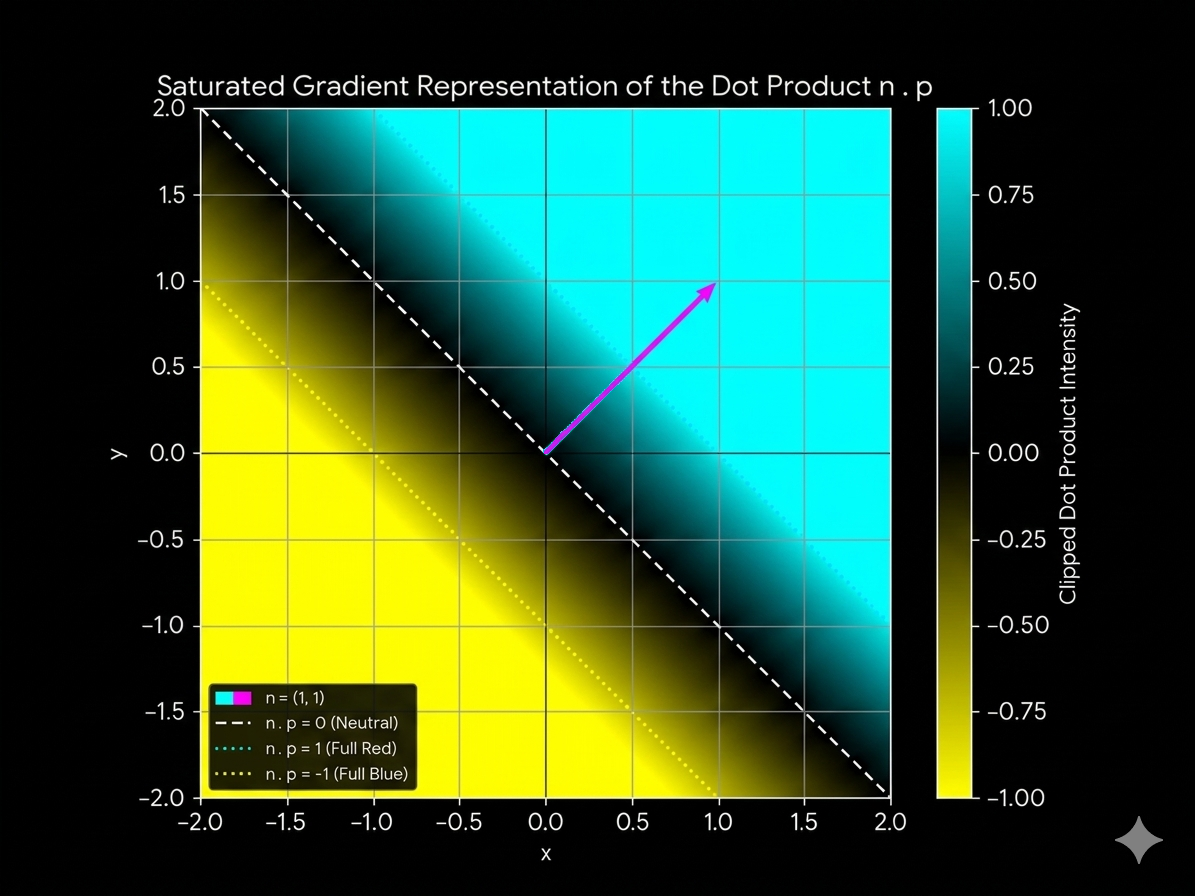
$$\begin{aligned}
&\text{But also this representation, also contains a more deeper meaning, on regards of how the line is draw }\\
&\text{for example on this same ideas we can identify this concepts like this.}\\
\end{aligned}$$
$$\begin{aligned}
&\text{Points where \ } \mathbf{n} \cdot \mathbf{p} = 0 \ \| \text{The coordinates (x,y) are part of the line }\\
&\text{Points where \ } \mathbf{n} \cdot \mathbf{p} > 0 \ \| \text{The coordinates (x,y) reflect on the n vector)}\\
&\text{Points where \ } \mathbf{n} \cdot \mathbf{p} < 0 \ \| \text{The coordinates (x,y) do not reflect on the n vector)}\\
\end{aligned}$$
$$\begin{aligned}
&\text{which are litterally the same thing, just visualize from an another angle, jaja jokes.}\\
&\text{get it is like doing the explanation of the first things, but is not the first thing cuz it not on angles.}\\
\end{aligned}$$
$$\begin{aligned}
&\text{Now one particularity that we could make here to happen, is the offset, but offset from what.}\\
&\text{in this case, you know what would be really awesome, to make the line be moved to the position we }\\
&\text{want it to be translated to, so the offset in this case would be the way we could make the line to be }\\
&\text{translated to in the direction of the vector director}\\
\end{aligned}$$
$$\\[3ex]$$
$$\mathbf{n} = (a, \, b) $$
$$\\[3ex]$$
$$\mathbf{p} = (x, \, y) $$
$$\\[3ex]$$
$$\mathbf{n} \cdot \mathbf{p} - \mathbf{offset} = (a \cdot x) + (b \cdot y) - OFFSET $$
$$\\[3ex]$$
$$\mathbf{n} \cdot \mathbf{p} - \mathbf{offset} = (a \cdot x) + (b \cdot y) - (\mathbf{|n|} * d) $$
$$\\[3ex]$$
$$OFFSET = \mathbf{distance\ from\ the\ origin} = \mathbf{|n|} \cdot d $$
$$\\[3ex]$$
$$OFFSET = \mathbf{|n|} \cdot d $$
$$\\[3ex]$$
$$d = \text{literally the distance we want to set the line from the origin} $$
$$\\[3ex]$$
$$OFFSET > \mathbf{0} \longrightarrow \text{line move direction of the vector} $$
$$\\[3ex]$$
$$OFFSET < \mathbf{0} \longrightarrow \text{line move opposite the direction of the vector} $$
$$\begin{aligned}
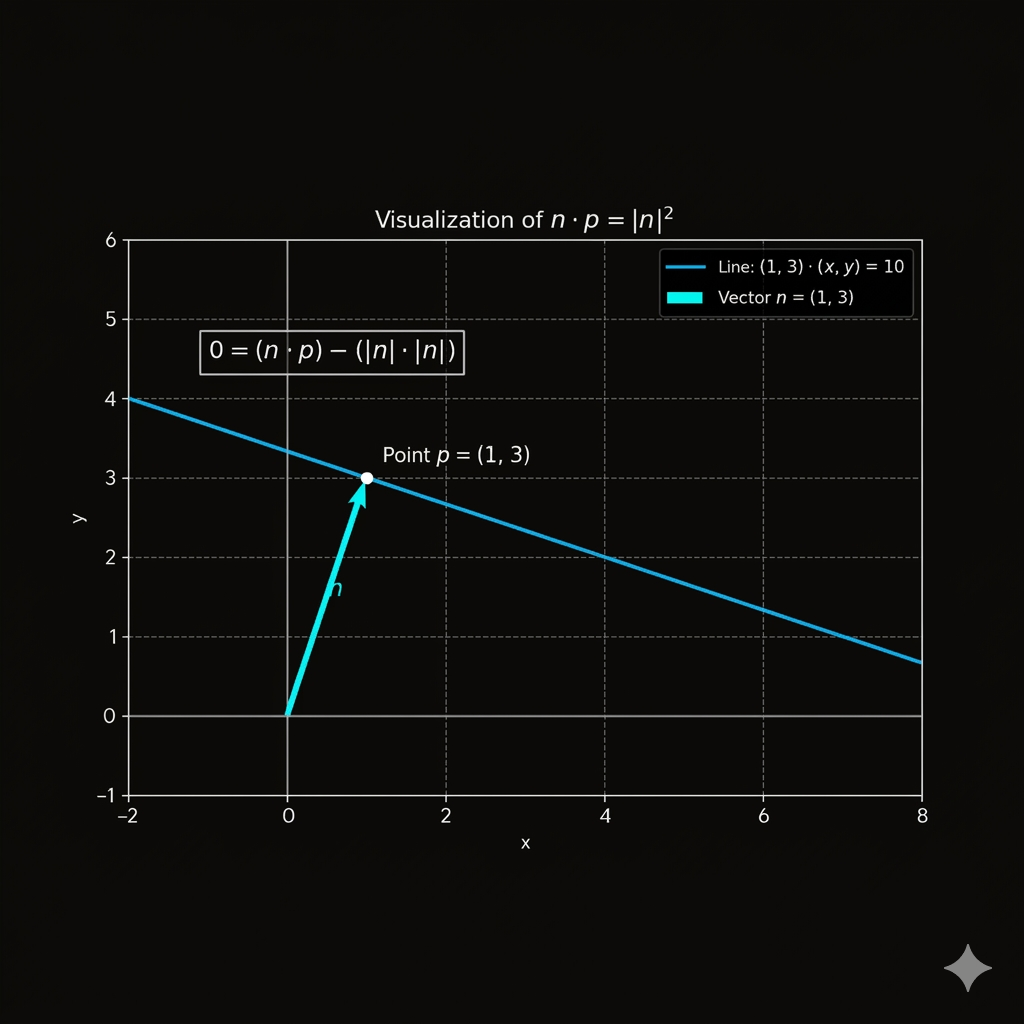
&\text{Now one property that is really interesting, is that if you multiply the values of the }\\
&\text{magnitude of the vector director square }, \mathbf{||n||^2},\ \text{you are going to get the line position}\\
&\text{directly over the point of the vector director. }\\
\end{aligned}$$
$$\\[3ex]$$
$$\mathbf{n} \cdot \mathbf{p} - \mathbf{offset} = (a \cdot x) + (b \cdot y) - (\mathbf{|n|} * \mathbf{|n|}) $$
$$\\[3ex]$$
$$\mathbf{n} \cdot \mathbf{p} - \mathbf{offset} = (a \cdot x) + (b \cdot y) - (\mathbf{|n|}^2) $$
$$\\[3ex]$$
$$\begin{aligned}
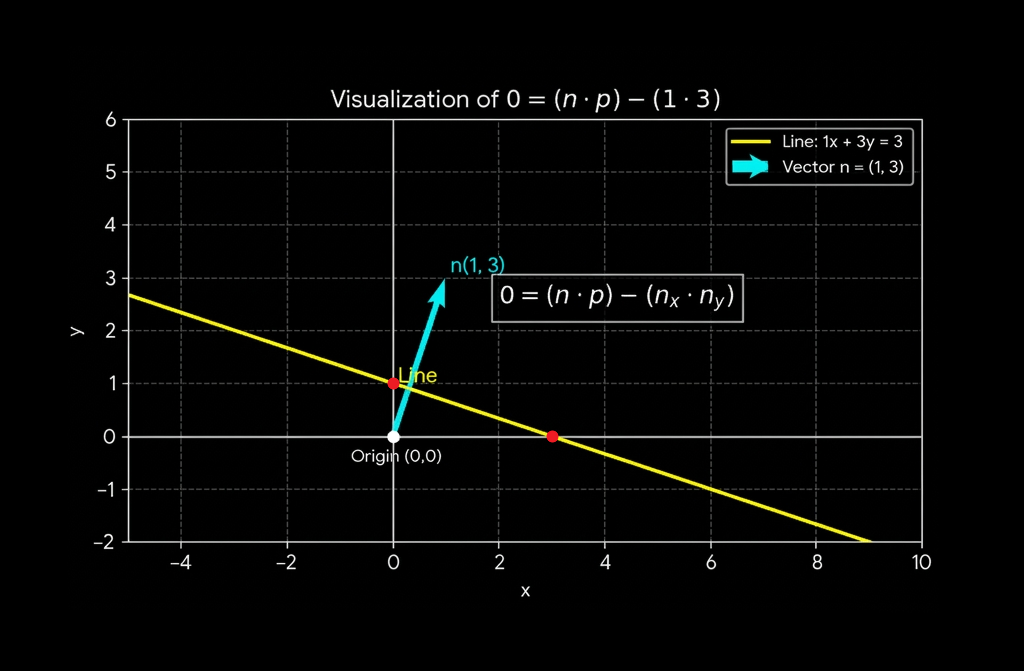
&\text{Another particularity of this property, is that if you want to get the line to cut particular points}\\
&\text{of the axis, it'll be necessary to set the values of the vector director line like this. }\\
\end{aligned}$$
$$\\[3ex]$$
$$\mathbf{n} = (a, \, b) $$
$$\\[3ex]$$
$$\mathbf{p} = (x, \, y) $$
$$\\[3ex]$$
$$offset = (a * b) $$
$$\\[3ex]$$
$$\mathbf{n} \cdot \mathbf{p} - \mathbf{offset} = (a \cdot x) + (b \cdot y) - (a * b) $$
$$\\[3ex]$$
$$\text{the,}\quad \mathbf{a}\quad \text{would cut the |Y axis } $$
$$\text{the,}\quad \mathbf{b}\quad \text{would cut the |X axis } $$
Shader_Triangle_LineEquation_1_SDF
Shader_Triangle_LineEquation_2_SDF
Continue RightTriangle
float disHypotenuse = dot(size, screenSpace ) - (size.x * size.y);

float sdf =  ( sign(disHypotenuse) < 0 && screenSpace.y > 0 && screenSpace.x > 0 ) ? 1.0 : 0.0 ;
float disHypotenuse = dot(size, screenSpace ) - (size.x * size.y);
float sdf = ( sign(disHypotenuse) < 0 && screenSpace.y > 0 && screenSpace.x > 0 ) ? 1.0 : 0.0 ;
$$\\[3ex]$$
$$\begin{aligned}
&\text{lets define this characteristics :}\\
\end{aligned}$$
$$ trianglePoint > 0.0 $$
$$\\[3ex]$$
$$trianglePoint = [\mathbf{(x, y)} \longrightarrow \mathbf{PlanePoint}] > 0.0 \quad $$
$$\\[3ex]$$
$$\text{Cuz the triangle is in the positive quadrant the point is always positive.} $$
$$\\[5ex]$$
$$\begin{aligned}
&\text{but that'll mean that all the points in the positive quadrant are part of a triangle and thats is just not true.}\\
&\text{and thats is where the hypothenuse/equation of the line enters in actions}\\
\end{aligned}$$
$$\\[3ex]$$
$$ \mathbf{PlanePoint} \longrightarrow p \quad | \quad \mathbf{disHypotenuse} = \mathbf{n} \cdot \mathbf{p} - \mathbf{offset} < 0 $$
$$\\[3ex]$$
$$\begin{aligned}
&\text{so the points that are also positive thanks to its inner properties in the plane, but also}\\
&\text{negative thanks to the equation of the line, points negative are going to be the points }\\
&\text{that lay inside the triangle.}\\
\end{aligned}$$
float sdf =  ( sign(disHypotenuse) < 0 && screenSpace.y > 0 && screenSpace.x > 0 ) ? 1.0 : 0.0 ;

float4 col = colorBlack;

col = fixed4(sdf, sdf, sdf, 1.0);
$$\text{And this is how we are going to get this image plotted in the shader.}$$
$$\text{But if we just graphics the code like this we are going to get this edges.}$$

$$\begin{aligned}
&\text{Which are very very sawtoothty, and which makes the look of it really really difficult to look at.}\\
&\text{So if we want to implement the techniques that we had learn on regards of how to smooth this edges.}\\
&\text{we are going to need to set this things like this.}\\
\end{aligned}$$
float sdf =  ( sign(disHypotenuse) < 0 && screenSpace.y > 0 && screenSpace.x > 0 ) ? 1.0 : 0.0 ;

float shader = 0.0;

if(sdf == 1.0)
{

    float shaderSmooth =  min(abs(disHypotenuse), min(screenSpace.x, screenSpace.y));

    shader = shaderSmooth;

    }

float shaderOut =  smoothstep(0.0, 0.004, shader);

float col = fixed4(shaderOut, shaderOut, shaderOut, 1.0);

return col;
$$\begin{aligned}
&\text{And if we want to put everything more packaged and without too many comparations and evaluation }\\
&\text{of minimus, and evaluation of absolutes. we can just package all this theories into something }\\
&\text{more precise, which means lesser evaluations.}\\
&\text{}\\
\end{aligned}$$
fixed4 frag (PixelData i) : SV_Target
{


float2 uv =  i.uv ;

float4 colorWhite = float4(1,1,1,1); // Color white.
float4 colorBlack = float4(0,0,0,1); // Color Black.

float2 coordinateScale = (uv * 2.0)  - 1.0;

float2 size = float2(0.5 ,0.5);

float2 screenSpace = coordinateScale;

float disHypotenuse = dot(size, screenSpace ) - (size.x * size.y);

screenSpace = -screenSpace;

float sdf = max(max(screenSpace.x, screenSpace.y), disHypotenuse);

float shader = 1.0 - smoothstep(0.0, 0.01, sdf);

float4 col = colorBlack;

col = fixed4(shader, shader, shader, 1.0);

return col;

}
$$\begin{aligned}
&\text{The idea is to create a relationship, that makes sense with few lines of code.}\\
&\text{Explain the sames theories but with few lines of code. }\\
\end{aligned}$$
screenSpace = -screenSpace;

float sdf = max(max(screenSpace.x, screenSpace.y), disHypotenuse);
$$\begin{aligned}
&\text{Now if you want to draw an issosceles triangle, or a rhombus the only thing that you need to do}\\
&\text{is modify the values of the screenspace X and Y, into their absolutes, like this. }\\
\end{aligned}$$
$$\begin{aligned}
&\text{This would be for the ISSOSCELES TRIANGLE}\\
&\text{}\\
\end{aligned}$$
Shader_Triangle_Rec_1_SDF
fixed4 frag (PixelData i) : SV_Target
{

float2 uv =  i.uv ;

float4 colorWhite = float4(1,1,1,1); // Color white.
float4 colorBlack = float4(0,0,0,1); // Color Black.


float2 coordinateScale = (uv * 2.0)  - 1.0;

float2 size = float2(0.5 ,0.5);

float2 screenSpace = coordinateScale;

screenSpace = float2(abs(screenSpace.x), screenSpace.y);

float disHypotenuse = dot(size, screenSpace ) - (size.x * size.y);

screenSpace = -screenSpace;

float sdf = max(max(screenSpace.x, screenSpace.y), disHypotenuse);

float shader = 1.0 - smoothstep(0.0, 0.01, sdf);

float4 col = colorBlack;

col = fixed4(shader, shader, shader, 1.0);

return col;
}
screenSpace = float2(abs(screenSpace.x), abs(screenSpace.y));
Shader_Triangle_Rec_2_SDF
Shader_Triangle_Rec_3_SDF
Shader_Triangle_Isosceles_1_SDF.shader
Shader_Triangle_Rhombus_1_SDF